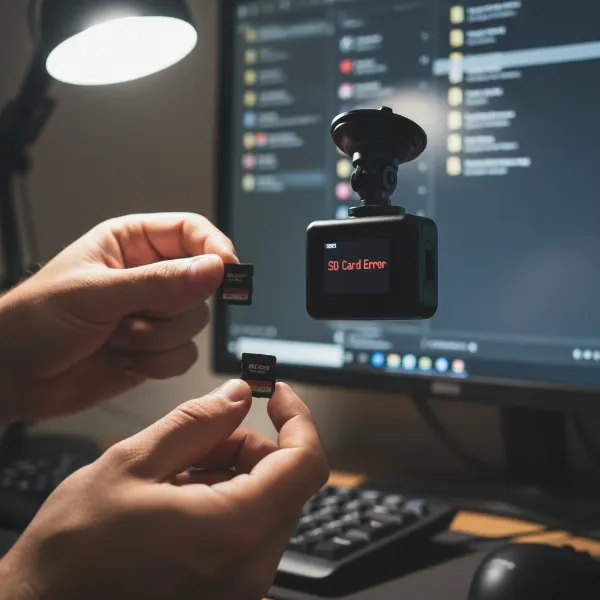
Has your dash cam ever captured a critical moment, only for blinding glare or distracting reflections to obscure the details? You’re not alone. Many drivers experience frustration with washed-out footage, especially on sunny days or when driving near reflective surfaces. The solution often lies in a small yet powerful accessory: a Circular Polarizing Lens (CPL) filter. This guide will demystify CPL filters, explaining how they work, why they’re essential for your dash cam, and how to use them to ensure your recordings are always sharp, vivid, and undeniable.
What is a CPL Filter and How Does It Work?
|
Our Picks for the Best Dash Cam in 2026
As an Amazon Associate I earn from qualifying purchases.
|
||
| Num | Product | Action |
|---|---|---|
| 1 | Dual 4K Dash Cam Front and Rear - Free 64G SD Card, 2160P+2160P UHD Dash Camera for Cars, Dashcam with 176°+160° Wide Angle, 3.5'' IPS Screen Dashcam, G-Sensor, WDR, Night Vision, 24H Parking Monitor |

|
| 2 | Dash Cam Front and Rear, 2.5K Dual Dash Camera for Cars, 2560P Mini Car Camera, 2 inch IPS Screen, 32GB Card Included, WDR Night Vision, 24 Hours Parking Monitor, G-Sensor, Support 256 GB Max |
|
| 3 | Garmin Dash Cam™ Mini 3, Ultracompact 1080p HD Dash Cam with a 140-degree Field of View, Built in Clarity™ Polarizer, Voice Controlled, Automatic Recording |
|
| 4 | WOLFBOX G840S 12" 4K Mirror Dash Cam Backup Camera, 5.8GHz WiFi Smart Rearview Mirror for Cars & Trucks, Front and Rear View Dual Cameras, Night Vision, Parking Assistance, Included 32GB Card & GPS |
|
| 5 | REDTIGER 4K Dash Cam Front Rear, STARVIS 2 Sensor, Free Card Included, 5.8GHz WiFi-20MB/s Fast Download, Dash Camera for Cars with GPS, WDR Night Vision, 170°Wide Angle, 24H Parking Mode(F7NP) |
|
| 6 | 4K Dash Cam Front, Built-in 5G WiFi, 64GB Card Included, Dash Camera for Cars, Mini Dashcam with Super Night Vision, Loop Recording, G-Sensor, 24 Hours Parking Monitor, Support 256GB Max |
|
| 7 | Dash Cam Front and Rear, 1080P Dash Camera for Cars, 3 Channel Car Camera Front Rear and Inside with 32GB Card, Loop Recording, Night Vision, HDR, 24Hr Parking, G-Sensor |
|
| 8 | ROVE R2-4K DUAL Dash Cam Front and Rear, STARVIS 2 Sensor, FREE 128GB Card Included, 5G WiFi - up to 20MB/s Fastest Download Speed with App, 4K 2160P/FHD Dash Camera for Cars, 3" IPS, 24H Parking Mode |
|
| 9 | 4K+4K Dash Cam Front and Rear, Free 128GB Card Included, 5.8GHz WiFi Dash Camera for Cars, Built-in GPS, G-Sensor, 170°Wide Angle, 3" IPS Screen, 24H Parking Mode, Support 512GB Max |
|
| 10 | VIOFO A229 Plus Dash Cam Front and Rear, Dual STARVIS 2 Sensors, 2 Channel HDR, 1440P+1440P Voice Control Car Dash Camera, 5GHz Wi-Fi, Voice Control, Ultra-Precise GPS |
|
A CPL filter, short for Circular Polarizing Lens or Circular Polarizing Filter, is an optical accessory designed to reduce glare and enhance color in your dash cam’s recordings. Think of it as a pair of high-quality polarized sunglasses for your camera lens, filtering out specific types of light that degrade image quality.
When sunlight reflects off non-metallic surfaces like your car’s windshield, dashboard, wet roads, or even water, the light waves become “polarized,” meaning they vibrate in a single plane. This polarized light often appears as harsh glare or reflections that can obscure crucial details in your video footage. A CPL filter works by containing a special polarizing material that blocks these horizontally polarized light waves. The filter typically consists of two main parts: a stationary base and a rotating ring. By gently rotating the outer ring, you adjust the angle at which the filter blocks light, allowing you to precisely control the amount of glare and reflections removed.
Unlike older linear polarizers, circular polarizers are essential for modern dash cams and cameras because they include an additional “quarter-wave plate.” This plate converts the linearly polarized light back into circularly polarized light, which prevents interference with your camera’s autofocus and auto-exposure systems, ensuring seamless operation without compromising essential features.
Why Your Dash Cam Needs a CPL Filter: Key Benefits
Integrating a CPL filter into your dash cam setup offers a multitude of advantages that significantly elevate the quality and reliability of your recordings.
Reduce Glare and Reflections
One of the most immediate and impactful benefits of a CPL filter is its ability to drastically cut down on unwanted glare and reflections. This includes the notorious dashboard reflection on your windshield, reflections from the sky, wet roads, glass buildings, and even other vehicles. By eliminating these visual obstructions, your dash cam can capture a clearer view of the road ahead, reducing instances of washed-out footage.
Enhance Video Quality
Beyond just glare reduction, CPL filters actively improve the overall aesthetic and informational quality of your videos. They enhance color saturation, making skies appear deeper blue and foliage more vibrant. Contrast is also improved, leading to sharper details and a more polished look for your recordings. This added clarity helps you focus on critical elements like road signs and traffic conditions.
Improve Evidence Accuracy
In the event of an accident or incident, having undeniably clear footage is paramount for insurance claims or legal proceedings. A CPL filter helps your dash cam capture essential details such as license plates, traffic signals, and vehicle movements with greater precision and less blur. This enhanced readability provides stronger, more accurate evidence when it matters most.
Protect the Lens
As a physical layer over your dash cam’s lens, a CPL filter also offers an additional layer of protection against scratches, dust, and fingerprints. This helps maintain the pristine condition of your lens, ensuring consistent, high-quality recording over the long term.
When to Use a CPL Filter for Optimal Results
A CPL filter is particularly effective in certain driving conditions where glare and reflections are most prevalent.
Daytime Driving, Especially on Sunny Days
This is where a CPL filter truly shines. Intense sunlight can create significant glare from your dashboard and windshield, making it difficult for your dash cam to record clearly. A CPL filter minimizes this glare, allowing for crisper, more detailed footage during the brightest hours.
Driving Near Reflective Surfaces
Whether you’re cruising past glass skyscrapers, driving over wet roads after a rain shower, or alongside bodies of water, these surfaces are notorious for reflecting sunlight. A CPL filter effectively cuts through these reflections, ensuring your dash cam captures the actual scene rather than distracting light bounces.
> “A CPL filter is one of the best accessories to add to your dashcam if you drive frequently during the day. This filter minimizes glare, increases image definition, and ensures your footage is sharp and detailed.” – Vantrue, Dashcam Accessory Expert
When to Consider Removing or Adjusting Your CPL Filter
While incredibly beneficial, CPL filters do have situations where their effect might be detrimental, as they inherently reduce the amount of light entering the lens.
Night Driving
During nighttime, your dash cam needs every photon of light it can get to produce clear images. A CPL filter can make nighttime footage appear too dark, potentially obscuring details rather than enhancing them. While some advanced CPL filters are designed to minimize this impact, it’s generally advisable to remove or slide the filter aside for optimal low-light performance.
Low-Light Conditions
Similar to night driving, other low-light scenarios can be negatively affected by a CPL filter. These include driving through heavily shaded roads, tunnels, underground parking garages, or during heavy rain or fog. In such situations, your camera benefits from maximum light intake, making the light-reducing effect of a CPL counterproductive.
Choosing the Right CPL Filter for Your Dash Cam
Selecting the appropriate CPL filter is crucial for achieving the best results. Not all filters are created equal, and compatibility is key.
- Compatibility with Your Dash Cam: Always check if the CPL filter is designed for your specific dash cam brand and model. Many filters are model-specific to ensure a perfect fit and alignment.
- Size and Fit: The filter’s diameter must match your dash cam’s lens size. An incorrect size can lead to vignetting (dark corners) or simply won’t fit.
- Quality of the Filter: Opt for filters made from high-quality, multi-coated optical glass. These materials effectively mitigate glare while maintaining image sharpness. Cheap plastic filters can degrade video quality, leading to soft or distorted footage.
- Adjustability: A good CPL filter should have a smoothly rotating ring, allowing for easy and precise adjustment to block reflections effectively based on lighting conditions.
- Installation Method: Consider how the filter attaches. Options include clip-on, adhesive, or magnetic designs. Magnetic filters, for instance, are very convenient for frequent adjustments or removal.
- Light Transmission: Some CPL filters reduce brightness more than others. Look for options that strike a good balance, effectively reducing glare without excessively dimming your footage.
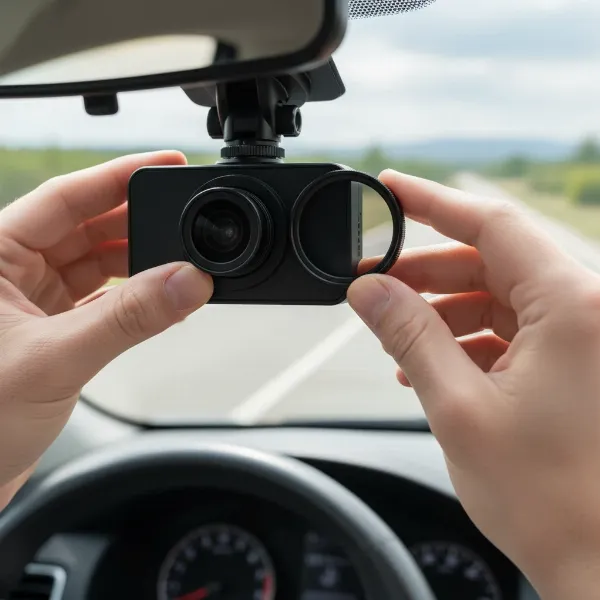 A CPL filter being installed on a dash cam lens, showing the rotating mechanism and secure fit.
Installation and Adjustment: Getting the Best Performance
Once you have the right CPL filter, proper installation and adjustment are vital to unlock its full potential.
- Clean Your Lens: Before installation, ensure both your dash cam lens and the CPL filter are free of dust, smudges, or fingerprints. Use a dedicated lens blower and a microfiber cloth for cleaning.
- Attach the Filter: Depending on your filter’s design, carefully clip it on, thread it onto the lens, or use its adhesive mechanism to secure it in place.
- Adjust for Glare Reduction: This is the most crucial step. Turn on your dash cam and view its live display (either on the unit itself or via its mobile app). Gently rotate the outer ring of the CPL filter. As you rotate, you will see reflections on the screen intensify or disappear. Stop rotating when the reflections are minimized, and you achieve the desired clarity. It’s often helpful to do this in a sunny location where reflections are prominent. Remember to periodically check and re-adjust the filter, as vibrations can sometimes cause it to shift over time.
Conclusion
A CPL filter is more than just an accessory; it’s an upgrade that significantly enhances your dash cam’s ability to capture clear, detailed, and reliable footage. By effectively combating distracting glare and reflections, it transforms ordinary recordings into high-quality visual evidence that can be invaluable in unexpected situations. While it shines brightest during daytime driving, understanding when and how to use it—including knowing when to remove it for low-light conditions—ensures you get the best performance every time. Invest in a quality CPL filter, and empower your dash cam to truly protect your journey. What improvements in your dash cam footage have you noticed after adding a CPL filter?
Frequently Asked Questions
Do all dash cams need a CPL filter?
While not every Dash Cam requires a CPL filter, many can greatly benefit from one, especially if you frequently drive during the day, in sunny conditions, or near highly reflective surfaces. It’s an optional enhancement that can significantly improve video quality.
Can I leave my CPL filter on all the time?
For optimal results, it’s generally recommended to remove or adjust your CPL filter during nighttime or very low-light conditions, as it can make footage appear too dark. However, for most daytime driving, leaving it on and properly adjusted is beneficial.
Does a CPL filter make dash cam videos darker?
Yes, CPL filters inherently reduce the amount of light entering the lens. This is usually unnoticeable or even beneficial in bright daylight by enhancing contrast. However, in low-light environments, this light reduction can make videos appear darker, which is why adjustment or removal is often advised for night driving.