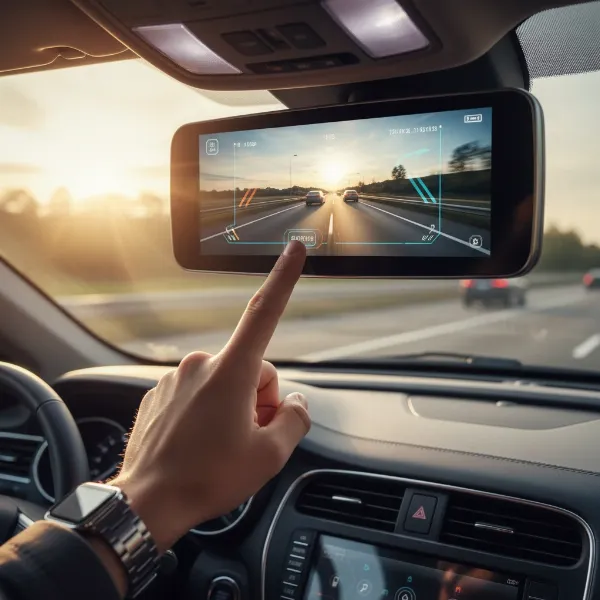
As a seasoned dash cam technician with over a decade of hands-on experience, I’ve seen countless setups—from basic plug-and-play units to sophisticated multi-channel systems. One of the most common concerns I hear from drivers is, “Will parking mode kill my car battery?” It’s a valid question, and the answer isn’t a simple yes or no. The truth is, while parking mode can drain your car battery if not managed correctly, modern dash cams and accessories offer robust solutions to ensure your vehicle starts every time. Let’s delve into how you can enjoy the peace of mind parking mode offers without ever needing a jump start.
What is Dash Cam Parking Mode?
Dash cam parking mode transforms your in-car camera into a silent guardian when your engine is off. Instead of constantly recording, which would quickly deplete your battery and storage, parking mode typically operates by detecting specific events. Common methods include:
- Motion Detection: The dash cam wakes up and records when it senses movement around your vehicle. This can be great for capturing minor bumps or suspicious activity.
- Impact Detection (G-Sensor): The camera records when its built-in G-sensor detects a physical impact, like a car door ding, a fender bender, or vandalism. This is often the most critical feature for security.
- Time-Lapse Recording: Some dash cams offer time-lapse, continuously recording at a very low frame rate (e.g., 1 frame per second). This provides a condensed overview of events without consuming excessive power or storage.
|
Our Picks for the Best Dash Cam in 2026
As an Amazon Associate I earn from qualifying purchases.
|
||
| Num | Product | Action |
|---|---|---|
| 1 | 4K Dash Cam Front, Built-in 5G WiFi, 64GB Card Included, Dash Camera for Cars, Mini Dashcam with Super Night Vision, Loop Recording, G-Sensor, 24 Hours Parking Monitor, Support 256GB Max |

|
| 2 | ROVE R2-4K DUAL Dash Cam Front and Rear, STARVIS 2 Sensor, FREE 128GB Card Included, 5G WiFi - up to 20MB/s Fastest Download Speed with App, 4K 2160P/FHD Dash Camera for Cars, 3" IPS, 24H Parking Mode |
|
| 3 | 4K+4K Dash Cam Front and Rear, Free 128GB Card Included, 5.8GHz WiFi Dash Camera for Cars, Built-in GPS, G-Sensor, 170°Wide Angle, 3" IPS Screen, 24H Parking Mode, Support 512GB Max |
|
| 4 | Dual 4K Dash Cam Front and Rear - Free 64G SD Card, 2160P+2160P UHD Dash Camera for Cars, Dashcam with 176°+160° Wide Angle, 3.5'' IPS Screen Dashcam, G-Sensor, WDR, Night Vision, 24H Parking Monitor |
|
| 5 | Garmin Dash Cam™ Mini 3, Ultracompact 1080p HD Dash Cam with a 140-degree Field of View, Built in Clarity™ Polarizer, Voice Controlled, Automatic Recording |
|
| 6 | WOLFBOX G840S 12" 4K Mirror Dash Cam Backup Camera, 5.8GHz WiFi Smart Rearview Mirror for Cars & Trucks, Front and Rear View Dual Cameras, Night Vision, Parking Assistance, Included 32GB Card & GPS |
|
| 7 | VIOFO A229 Plus Dash Cam Front and Rear, Dual STARVIS 2 Sensors, 2 Channel HDR, 1440P+1440P Voice Control Car Dash Camera, 5GHz Wi-Fi, Voice Control, Ultra-Precise GPS |
|
| 8 | REDTIGER 4K Dash Cam Front Rear, STARVIS 2 Sensor, Free Card Included, 5.8GHz WiFi-20MB/s Fast Download, Dash Camera for Cars with GPS, WDR Night Vision, 170°Wide Angle, 24H Parking Mode(F7NP) |
|
| 9 | Dash Cam Front and Rear, 1080P Dash Camera for Cars, 3 Channel Car Camera Front Rear and Inside with 32GB Card, Loop Recording, Night Vision, HDR, 24Hr Parking, G-Sensor |
|
| 10 | Dash Cam Front and Rear, 2.5K Dual Dash Camera for Cars, 2560P Mini Car Camera, 2 inch IPS Screen, 32GB Card Included, WDR Night Vision, 24 Hours Parking Monitor, G-Sensor, Support 256 GB Max |
|
These modes are designed to capture critical moments, offering invaluable evidence if something happens to your parked vehicle.
The Truth About Dash Cam Battery Drain
The fear of a dead car battery due to a dash cam is understandable. An average car battery, when healthy, has a capacity of around 50-70 amp-hours (Ah). Dash cams, even in parking mode, draw power. A standard dash cam might draw 0.5-2 amps when actively recording, but in parking mode, this can drop significantly to 0.1-0.3 amps, depending on the model and settings.
If a dash cam is constantly drawing power without any protection, it will eventually drain your car battery to a point where your vehicle cannot start. However, most contemporary dash cams and their accompanying power solutions are specifically engineered to prevent this. The key lies in understanding how your dash cam powers itself and the built-in safeguards available.
> “Many drivers mistakenly believe all dash cams will drain their battery. With the right setup and settings, modern dash cams in parking mode are remarkably safe for your vehicle’s battery.” – [Your Name/Role], Admin, Dashcamon.com
How Dash Cams Power Parking Mode
For parking mode to function, a dash cam needs a continuous power supply even when the engine is off. There are generally two primary methods for this:
Hardwiring Kits
This is the most common and recommended method for reliable parking mode. A hardwiring kit connects your dash cam directly to your car’s fuse box, providing constant power. Crucially, these kits nearly always include a low-voltage cutoff (LVC) feature. This intelligent circuit monitors your car battery’s voltage and, once it drops below a pre-set threshold, automatically cuts power to the dash cam. This ensures enough juice is left to start your engine.
- Benefits: Reliable, continuous power for extended periods, integrated battery protection.
- Considerations: Requires a slightly more involved installation (often best done by a professional), incorrect settings can still lead to issues.
Dedicated Dash Cam Battery Packs
For ultimate peace of mind, or if you frequently park for very long periods, a dedicated external dash cam battery pack is an excellent solution. These separate battery units charge while you drive and then power your dash cam when your vehicle is parked, completely isolating your car’s starter battery from the dash cam’s power draw.
- Benefits: Zero risk to your car battery, significantly extended parking mode recording times (often 24-48+ hours), ideal for long-term parking or older car batteries.
- Considerations: Higher initial cost, requires space for installation, some models are larger than others. Many modern battery packs use LiFePO4 (Lithium Iron Phosphate) technology, known for its safety and durability, even in extreme temperatures.
Cigarette Lighter Ports
While convenient for driving, directly plugging your dash cam into a cigarette lighter socket is generally unsuitable for parking mode. Most vehicles cut power to these sockets when the ignition is off, meaning your dash cam won’t record. If your car has a “permanently live” cigarette lighter, using it without any voltage cutoff mechanism will almost certainly lead to a dead battery.
Essential Features to Prevent Battery Drain
When selecting a dash cam or setting up parking mode, focus on these critical features:
Low-Voltage Cutoff (LVC)
The LVC is your primary safeguard. Most quality hardwiring kits and many modern dash cams have adjustable LVC settings. It’s crucial to set this correctly:
- How it Works: The LVC module constantly monitors your car battery’s voltage. When the voltage dips to your chosen level, it shuts off the dash cam to prevent further discharge.
- Recommended Settings: For a healthy 12V car battery, a common range is 12.2V to 12.4V. Setting it too low (e.g., 11.8V) increases the risk of not being able to start your car, especially in cold weather which reduces battery efficiency. If your car battery is older or you park for days, leaning towards the higher end (12.4V+) offers more protection.
- Factors: Battery age, ambient temperature, and the overall health of your vehicle’s electrical system can influence the effective cutoff. Always confirm your dash cam is powering down at the set voltage after installation.
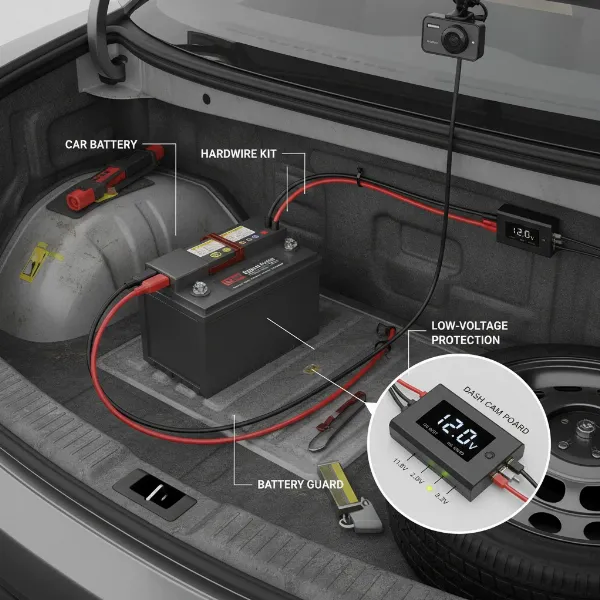 A close-up view of a dash cam hardwire kit with a clearly visible low-voltage cutoff switch, showing voltage options. Illustration of car battery protection.
Advanced Parking Mode Options
The type of parking mode you use significantly impacts power consumption:
- Impact-Only Mode (Buffered Recording): This is often the most battery-efficient. The dash cam remains in a low-power standby state, only recording when an impact is detected by the G-sensor. High-end models often offer “buffered” recording, capturing footage from before and after the event.
- Motion Detection with Sensitivity Control: While useful, motion detection can be power-intensive if triggered frequently by passing cars, pedestrians, or even swaying trees. Look for dash cams that allow you to adjust sensitivity and define specific “motion zones” to minimize false triggers.
- Time-Lapse Recording: A good compromise, offering continuous coverage at a lower power draw than full-frame video, ideal for longer parking sessions.
- Radar-Based Parking Mode: Advanced dash cams, like some Thinkware models, use radar to detect approaching movement before an impact, allowing them to wake up and record more efficiently, significantly extending parking mode duration with minimal battery impact.
Optimizing Your Dash Cam for Parking Mode
Achieving optimal parking mode performance without battery drain requires a holistic approach:
Proper Installation
If hardwiring, ensure it’s done correctly. This involves connecting to both a constant power fuse (for parking mode) and an accessory/ignition-switched fuse (for driving mode), along with a solid ground connection. Using an “add-a-circuit” fuse tap is a clean way to integrate the hardwire kit without damaging existing wiring. If you’re not comfortable with automotive electrical work, professional installation is always recommended.
Adjusting Settings
- Voltage Cutoff: As discussed, set your LVC appropriately for your car and climate.
- Parking Mode Type: Choose the most suitable parking mode for your typical parking environment. For a quiet garage, impact-only might suffice. For a busy street, consider time-lapse or carefully calibrated motion detection.
- Parking Timer: Some dash cams allow you to set a timer for parking mode (e.g., 6, 12, 24 hours). This adds another layer of protection, especially if you forget to drive for an extended period.
- Disable Unnecessary Features: Turn off Wi-Fi, GPS (if not needed), or screen illumination in parking mode if your dash cam allows, as these can draw extra power.
Vehicle Battery Health
A weak or old car battery is far more susceptible to draining, regardless of your dash cam setup. Regular battery checks and maintenance are crucial. If you primarily make short trips, your car’s alternator might not fully recharge the battery, making it vulnerable. Consider a longer drive once a week or using a smart trickle charger at home if your car sits for extended periods.
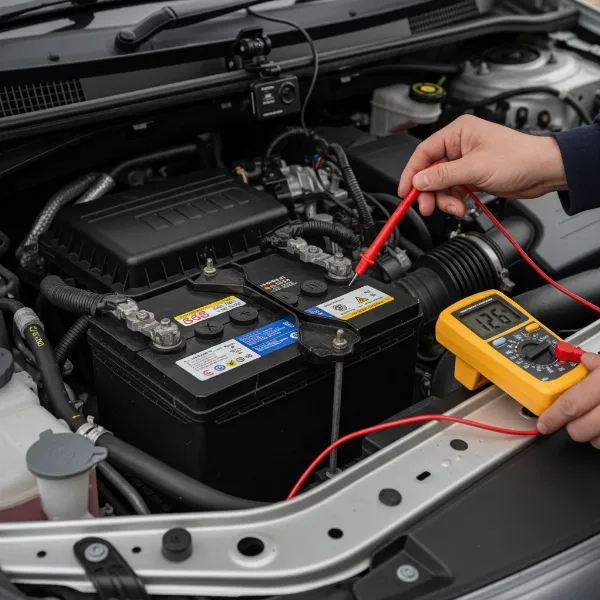 A visual representation of a car battery with a multimeter checking its voltage, highlighting the importance of battery health for dash cam parking mode.
Environmental Factors
Extreme temperatures, both hot and cold, can negatively impact battery performance. Parking in a shaded area during summer or keeping your car garaged in winter can help maintain optimal battery health, reducing the risk of a dash cam-related drain.
Top Solutions to Avoid Dash Cam Battery Drain
Based on my extensive experience, here are the most effective ways to ensure your dash cam’s parking mode never leaves you stranded:
- High-Quality Hardwire Kit with Adjustable Low-Voltage Cutoff: This is the foundational solution for most drivers. Invest in a reputable brand that offers precise voltage settings and reliable performance.
- Dedicated External Dash Cam Battery Pack: If you demand the longest possible parking mode duration, have an older car battery, or want absolute isolation from your car’s electrical system, an external battery pack is the superior choice. Products like the BlackVue Power Magic Ultra Battery or BlackboxMyCar PowerCell 8 are excellent examples of LiFePO4-based solutions that provide extended power without impacting your vehicle’s starter battery.
- Choose a Dash Cam with Advanced, Energy-Efficient Parking Modes: Look for cameras that offer impact-only (buffered), radar-based detection, or highly customizable motion detection with low power consumption. Brands like Thinkware and BlackVue are often at the forefront of these technologies.
Conclusion
The question of whether parking mode will kill your car battery is valid, but the answer is reassuringly positive with proper planning. Modern dash cams, coupled with the right power solutions like hardwiring kits with adjustable low-voltage cutoffs or dedicated external battery packs, are designed to protect your vehicle’s starting power. By understanding how parking mode works, optimizing your settings, and maintaining your car battery’s health, you can confidently rely on your dash cam to be your vigilant guardian, ensuring you capture crucial events without ever worrying about a dead battery.
What steps will you take to optimize your dash cam’s parking mode for ultimate reliability?
Frequently Asked Questions
What voltage cutoff should I choose for my dash cam?
For most healthy 12V car batteries, a low-voltage cutoff setting between 12.2V and 12.4V is recommended. If you have an older battery, live in a cold climate, or park for extended periods, opt for the higher end (12.4V) to provide an extra margin of safety for starting your engine.
Do I need an external dash cam battery pack?
An external dash cam battery pack is highly recommended if you desire extended parking mode recording (e.g., beyond 8-12 hours), want to entirely separate your dash cam’s power draw from your car battery, or frequently leave your vehicle parked for long durations. They charge while you drive and power the camera when parked.
Which parking mode drains the least battery?
Impact-only parking mode, especially with buffered recording, generally consumes the least battery power as the Dash Cam remains in a low-power state until an event occurs. Time-lapse recording is also very efficient for continuous coverage, while motion detection can vary widely based on sensitivity and the environment.