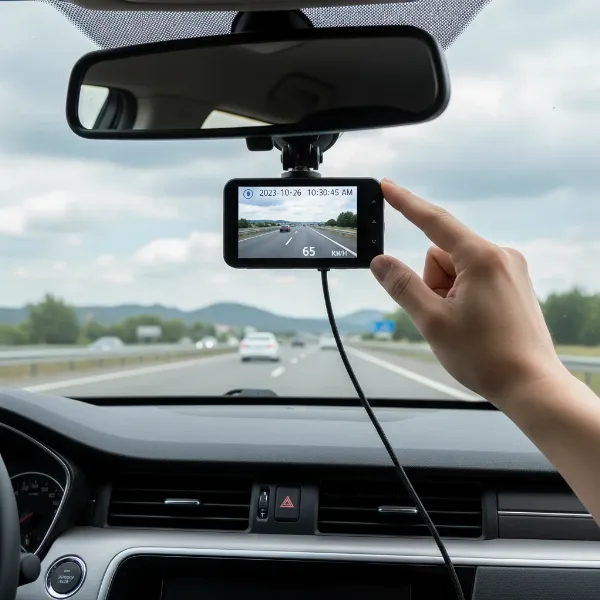
Driving on today’s roads can often feel like navigating a complex, unpredictable maze. From unexpected incidents to the simple desire to capture scenic journeys, a reliable dash cam has become an indispensable companion for many drivers. Among the myriad options available, the Kingslim D4 has carved out a niche for itself as an affordable dual-channel dash cam that promises high-end features without the premium price tag. But does it truly deliver on its promises, or are there compromises lurking beneath its attractive specifications? This comprehensive review delves into the Kingslim D4, evaluating its capabilities, performance, and overall value to help you decide if it’s the right eyewitness for your vehicle.
Understanding the Kingslim D4: A Dual Dash Cam Solution
The Kingslim D4 positions itself as a robust solution for comprehensive vehicle surveillance, offering both front and rear recording capabilities. At its core, the system typically features a front camera capable of recording in 4K (2160p at 25fps) or 2.5K (1440p at 30fps) resolutions, paired with a rear camera that captures footage in 1080P resolution. This dual setup provides a wider scope of protection, documenting events unfolding both ahead of and behind your vehicle.
The main unit boasts a responsive 3-inch IPS touchscreen, which simplifies navigation through settings and playback compared to traditional button-based interfaces. Under the hood, the D4 is often equipped with a Sony IMX335 STARVIS sensor for its front camera, combined with a Hisilicon Hi3559 processor. This hardware combination is designed to enhance image quality, particularly in challenging lighting conditions. With a wide 170° field of view for the front camera and a 150° view for the rear, the D4 aims to minimize blind spots, offering extensive coverage of the road.
Connectivity is another key aspect, with built-in Wi-Fi and GPS modules. The GPS functionality records your driving route and speed, embedding this crucial data into your video files for accurate incident reconstruction. The Wi-Fi allows for seamless connection to a smartphone app, enabling users to view live feeds, download recorded footage, and adjust settings remotely. The Kingslim D4 supports microSD cards up to 256GB, ensuring ample storage for high-resolution video evidence.
Diving Deeper: Performance and Video Quality
While the Kingslim D4’s specifications paint a promising picture, real-world video quality is where a dash cam truly proves its worth.
Daytime Footage
|
Our Picks for the Best Dash Cam in 2026
As an Amazon Associate I earn from qualifying purchases.
|
||
| Num | Product | Action |
|---|---|---|
| 1 | Garmin Dash Cam™ Mini 3, Ultracompact 1080p HD Dash Cam with a 140-degree Field of View, Built in Clarity™ Polarizer, Voice Controlled, Automatic Recording |

|
| 2 | WOLFBOX G840S 12" 4K Mirror Dash Cam Backup Camera, 5.8GHz WiFi Smart Rearview Mirror for Cars & Trucks, Front and Rear View Dual Cameras, Night Vision, Parking Assistance, Included 32GB Card & GPS |
|
| 3 | Dual 4K Dash Cam Front and Rear - Free 64G SD Card, 2160P+2160P UHD Dash Camera for Cars, Dashcam with 176°+160° Wide Angle, 3.5'' IPS Screen Dashcam, G-Sensor, WDR, Night Vision, 24H Parking Monitor |
|
| 4 | Dash Cam Front and Rear, 1080P Dash Camera for Cars, 3 Channel Car Camera Front Rear and Inside with 32GB Card, Loop Recording, Night Vision, HDR, 24Hr Parking, G-Sensor |
|
| 5 | 4K+4K Dash Cam Front and Rear, Free 128GB Card Included, 5.8GHz WiFi Dash Camera for Cars, Built-in GPS, G-Sensor, 170°Wide Angle, 3" IPS Screen, 24H Parking Mode, Support 512GB Max |
|
| 6 | Dash Cam Front and Rear, 2.5K Dual Dash Camera for Cars, 2560P Mini Car Camera, 2 inch IPS Screen, 32GB Card Included, WDR Night Vision, 24 Hours Parking Monitor, G-Sensor, Support 256 GB Max |
|
| 7 | ROVE R2-4K DUAL Dash Cam Front and Rear, STARVIS 2 Sensor, FREE 128GB Card Included, 5G WiFi - up to 20MB/s Fastest Download Speed with App, 4K 2160P/FHD Dash Camera for Cars, 3" IPS, 24H Parking Mode |
|
| 8 | REDTIGER 4K Dash Cam Front Rear, STARVIS 2 Sensor, Free Card Included, 5.8GHz WiFi-20MB/s Fast Download, Dash Camera for Cars with GPS, WDR Night Vision, 170°Wide Angle, 24H Parking Mode(F7NP) |
|
| 9 | 4K Dash Cam Front, Built-in 5G WiFi, 64GB Card Included, Dash Camera for Cars, Mini Dashcam with Super Night Vision, Loop Recording, G-Sensor, 24 Hours Parking Monitor, Support 256GB Max |
|
| 10 | VIOFO A229 Plus Dash Cam Front and Rear, Dual STARVIS 2 Sensors, 2 Channel HDR, 1440P+1440P Voice Control Car Dash Camera, 5GHz Wi-Fi, Voice Control, Ultra-Precise GPS |
|
In optimal daytime conditions, the Kingslim D4 generally produces crisp and clear footage from the front camera. Colors are typically vibrant, and the overall image quality is good enough to discern general road conditions and traffic flow. However, several reviews highlight a common point of contention: the clarity of critical details like license plates and small road signs can sometimes be less impressive than expected from a 4K camera. The “4K” resolution, while technically present, may not always translate into the superior fine detail that users anticipate, with some reporting a surprising lack of sharpness in crucial areas. This suggests that while the sensor is capable, the internal processing might not fully optimize the output for maximum detail and legibility.
Night Vision
Night vision is a critical feature for any dash cam, and the Kingslim D4 attempts to tackle low-light scenarios with its Sony STARVIS sensor, f/1.8 aperture, and Wide Dynamic Range (WDR) technology. These elements work together to gather more light and balance exposure, aiming to produce clearer images after dusk. For the front camera, footage in genuinely low-light environments (without significant direct light sources) can be decent, showing a reasonable amount of detail.
However, the D4 often struggles when confronted with extreme lighting contrasts, such as oncoming headlights or bright streetlights. In these situations, the footage can become overexposed, blurring out details and making license plates challenging to read. The rear camera’s night performance is particularly noted as being grainy and suffering from light distortion, which can severely impact its effectiveness in identifying objects or vehicles behind you in the dark. This suggests that while the D4 has mechanisms for night vision, its execution can be inconsistent, especially in dynamic urban night driving.
> “While the Kingslim D4 offers a compelling feature set at its price point, drivers prioritizing absolute clarity for license plates in all lighting conditions might find its 4K performance doesn’t quite meet the highest expectations.” – Dashcamon.com Admin, Dash Cam Expert
Essential Features for Every Driver
Beyond video quality, the Kingslim D4 integrates several features designed to enhance safety and convenience for drivers.
- GPS Tracking: The built-in GPS module automatically logs your vehicle’s speed and precise location data, which can be invaluable in the event of an accident or for tracking travel routes. This information is embedded into the video files, allowing for a detailed reconstruction of events using compatible playback software. However, some users have reported issues with GPS data not consistently embedding or the app failing to read it correctly, which can diminish this feature’s reliability.
- Wi-Fi Connectivity and App Control: The D4’s Wi-Fi capability allows you to connect your smartphone via a dedicated app (Kingslim or Roadcam, depending on the version). This provides a convenient way to preview live footage, review recorded videos, and transfer files directly to your phone without removing the microSD card. While this feature promises ease of use, user feedback indicates that the app experience can be inconsistent, with reports of slow speeds, connectivity issues, and potentially requesting access to unrelated phone permissions. For some, relying on manual microSD card transfer remains the more reliable option.
- Parking Monitor with G-Sensor: For 24/7 protection, the Kingslim D4 includes a parking mode. This feature leverages a G-sensor to detect sudden impacts or movements while your vehicle is parked, automatically triggering recording. It also offers motion detection, recording if activity is sensed around your car. To enable continuous, non-buffered parking mode, the dash cam requires hardwiring to your vehicle’s fuse box (an optional hardwire kit is sold separately). This ensures the camera draws power directly from the car battery without draining it completely, providing peace of mind even when you’re away from your vehicle.
- Loop Recording and Emergency Video Lock: Standard in most modern dash cams, the D4 features loop recording, which continuously records over the oldest files once the memory card is full. This ensures that you never run out of storage space. In the event of a sudden impact or collision, the G-sensor automatically locks the current video segment, preventing it from being overwritten. This “emergency video lock” is crucial for preserving critical evidence.
- Touchscreen Interface: The 3-inch IPS touchscreen display provides an intuitive way to interact with the dash cam’s settings and playback. This modern interface reduces the need for multiple physical buttons, making it straightforward to operate. However, some users might find the screen size slightly small for detailed video review directly on the device, and the absence of a dedicated physical save button means you must interact with the touchscreen to manually lock footage.
Installation and Usability: What to Expect
Installing the Kingslim D4 involves a few steps, which can vary slightly depending on your preference for the rear camera placement and power source.
Mounting Options
The Kingslim D4 typically comes with an adhesive mount (often combined with a GPS module) and electrostatic stickers for secure attachment to the windshield. The main camera body snaps onto this mount. While the adhesive provides a strong hold, a common complaint is the limited adjustability. The mount often lacks horizontal swivel, and vertical adjustment may be restricted to about 30 degrees, which can be challenging for vehicles with steeply angled or near-vertical windscreens. Some users also note that adhesive mounts can lose their grip in extreme heat. The rear camera can be mounted using adhesive pads and, being waterproof, offers the flexibility of internal or external placement, often above the license plate.
Cable Management
Routing the cables for a dual dash cam system, especially the long cable for the rear camera (often around 23 feet), requires some effort to achieve a neat, professional look. The power is usually supplied via a car charger plugged into your vehicle’s cigarette lighter socket, with a mini-USB connector for the dash cam. For a cleaner install and to enable continuous parking mode, many users opt for a hardwire kit, which connects directly to the car’s fuse box. The kit usually includes cable clips and a pry tool to help tuck wires along the headliner, A-pillar, and door sills.
SD Card
The Kingslim D4 supports a microSD card up to 256GB (a U3 speed class card is recommended for stable 4K recording, but typically not included). It’s crucial to format the SD card within the dash cam itself before its first use and periodically thereafter (e.g., every two months) to maintain optimal performance and prevent errors.
User Interface
The 3-inch IPS touchscreen offers a straightforward user experience for adjusting settings like resolution, loop recording duration, G-sensor sensitivity, and parking mode options. While the on-device interface is generally user-friendly, the Kingslim app, despite its potential convenience for remote access, has been reported to have stability and speed issues, sometimes hindering the seamless download and review of footage.
Pros and Cons: A Balanced View
To provide a quick overview, here’s a summary of the Kingslim D4’s strengths and weaknesses:
Pros:
- Affordable Price: Excellent value for a dual-channel 4K/1080P system.
- Dual-Channel Recording: Comprehensive front and rear coverage.
- 3-inch IPS Touchscreen: Intuitive and easy to navigate settings.
- Built-in Wi-Fi & GPS: Allows for smartphone connectivity and location/speed tracking.
- Sony STARVIS Sensor: Enhances low-light performance for the front camera.
- Parking Mode (G-Sensor/Motion Detection): Provides surveillance when parked (requires hardwiring for full functionality).
- Wide Viewing Angles: 170° front and 150° rear for broad coverage.
- Large SD Card Support: Accommodates up to 256GB for extended recording.
Cons:
- Inconsistent Video Clarity: While 4K, fine details like license plates can be difficult to read, especially at night or in challenging lighting.
- Software/App Issues: The accompanying mobile app can be buggy, slow, and unreliable for downloading footage or managing settings.
- Limited Mount Adjustability: Adhesive mount lacks horizontal swivel, restricting optimal positioning for some vehicles.
- Night Vision Limitations: Rear camera night footage is often grainy; front camera struggles with overexposure from bright light sources.
- No Physical Save Button: Manual video saving requires touchscreen interaction.
- GPS Data Reliability: Some reports of GPS data not consistently embedding in videos or issues with app playback.
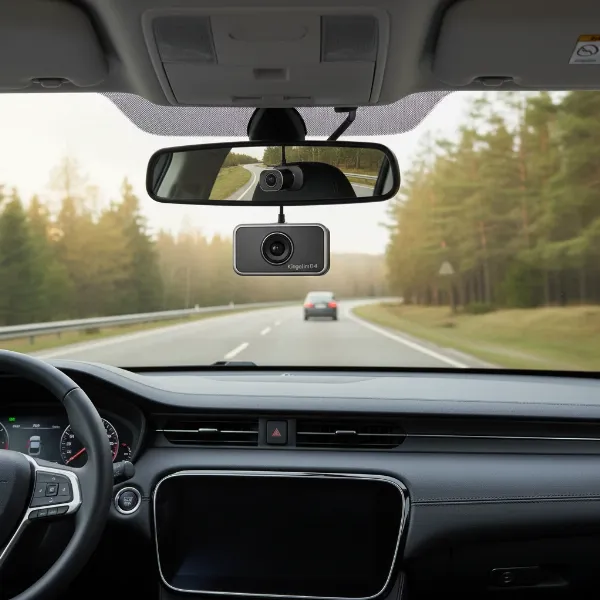 Kingslim D4 dual dash cam mounted on a windshield, showing its compact design and the front-facing lens.
Is the Kingslim D4 the Right Dash Cam for You?
The Kingslim D4 dash cam presents a compelling option for drivers seeking an affordable, dual-channel recording solution. It ticks many boxes with its 4K front camera, 1080P rear camera, GPS, Wi-Fi, and touchscreen interface, making it a feature-rich package for its price point.
This dash cam is particularly suitable for:
- Budget-conscious drivers who need both front and rear recording capabilities without breaking the bank.
- Those who prioritize general event recording for insurance purposes and everyday safety.
- Users who appreciate a touchscreen interface over physical buttons.
- Individuals willing to potentially bypass the mobile app for footage transfer (by directly using the microSD card) due to reported connectivity issues.
However, if your primary concern is absolute crystal-clear license plate readability in all lighting conditions, particularly at night, or if you demand a perfectly stable and intuitive mobile app experience, you might find the D4 falls slightly short of expectations. In such cases, investing a bit more in a higher-end model with more advanced image processing and refined software might be a better choice.
Ultimately, the Kingslim D4 offers significant value. It’s a good entry point into the dual dash cam market, providing a solid foundation of features that contribute to peace of mind on the road, provided you understand and can work around its minor imperfections.
Frequently Asked Questions
What resolution does the Kingslim D4 record at?
The Kingslim D4 typically records in 4K (2160p at 25fps) for the front camera and 1080P for the rear camera simultaneously. You can also switch the front camera to 2.5K (1440p at 30fps) for daily recording, paired with 1080P for the rear.
Does the Kingslim D4 have parking mode?
Yes, the Kingslim D4 includes a parking mode with G-sensor (impact detection) and motion detection. For continuous, non-buffered parking surveillance, an optional hardwire kit is required to connect the Dash Cam directly to your car’s power supply.
Is the Kingslim D4 easy to install?
Installing the Kingslim D4 front camera is straightforward using its adhesive mount. The rear camera requires routing a long cable, which can take some effort to conceal neatly. SD card formatting is also a necessary initial step.
Can I view footage from the Kingslim D4 on my phone?
Yes, the Kingslim D4 has built-in Wi-Fi, allowing you to connect to a dedicated smartphone app (Kingslim or Roadcam). Through the app, you can view live feeds, playback recorded videos, download clips, and adjust settings, though some users report app stability issues.