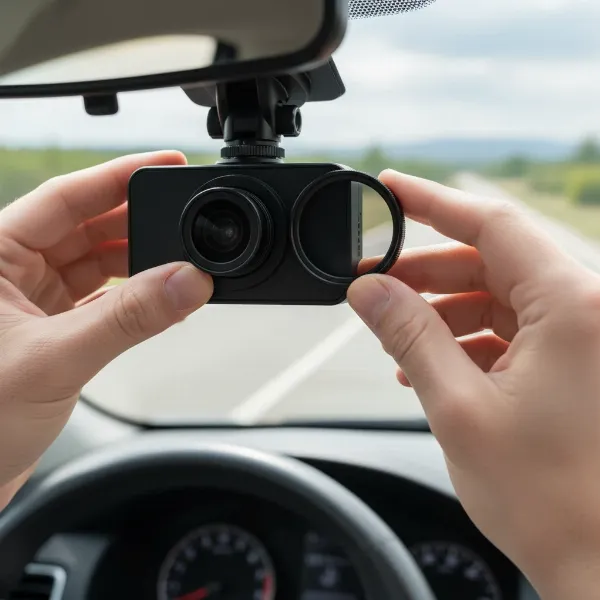
Driving for Uber, Lyft, or any rideshare service can be a rewarding way to earn income, but it also comes with unique challenges and potential risks. From navigating busy streets to interacting with a constant stream of new passengers, rideshare drivers face situations daily that traditional commuters often don’t. This is precisely why a reliable dash cam isn’t just a luxury; it’s an indispensable tool for safety, security, and peace of mind on every journey. Choosing the right dash cam can be daunting with countless options available, but this comprehensive guide will equip you with the knowledge to make the best decision for your rideshare career.
Why Every Rideshare Driver Needs a Dash Cam
The road can be unpredictable, and as a rideshare driver, you’re constantly exposed to various scenarios, from minor fender-benders to serious accidents and passenger disputes. A dash cam acts as your silent, objective witness, providing an irrefutable account of events. It’s a powerful protective measure, with up to 97% of Uber and Lyft drivers believing that dashcams are effective in preventing mishaps.
Firstly, a dash cam offers crucial protection against false accusations and fraudulent claims, whether from another driver in an accident or a passenger making an unwarranted complaint. High-quality video and audio recordings serve as concrete evidence to support your version of events, potentially saving you from legal headaches, insurance premium hikes, or even deactivation from the rideshare platform. Secondly, the visible presence of a dash cam can act as a powerful deterrent against unruly passenger behavior or theft, encouraging a more respectful and safer environment within your vehicle. Lastly, these devices offer invaluable peace of mind, allowing you to focus on driving while knowing that your trips are thoroughly documented.
Types of Dash Cams for Rideshare Drivers
Understanding the different types of dash cams is the first step in selecting the ideal device for your rideshare needs. Each type offers varying levels of coverage, catering to specific concerns a driver might have.
- Front-Facing Dash Cams: These record only the road ahead. While better than nothing for general accident evidence, they lack the crucial interior coverage essential for rideshare drivers. For this reason, they are generally not recommended as the sole dash cam for professional rideshare use.
- Dual-Channel Dash Cams (Front + Interior): This is the minimum recommended setup for Uber and Lyft drivers. These systems feature one camera lens recording the road ahead and another simultaneously recording the vehicle’s interior. This configuration provides essential documentation for both external incidents and interactions with passengers.
- Three-Channel Dash Cams (Front + Interior + Rear): Offering the most comprehensive coverage, three-channel systems add a third camera to monitor the rear of your vehicle. This setup ensures you have a complete 360-degree view around your car, protecting against rear-end collisions and incidents involving passengers exiting the vehicle. Many experienced drivers prefer this option for ultimate security.
- Mirror Dash Cams: These dash cams are designed to replace your existing rearview mirror or clip over it, often featuring a large screen that displays camera feeds. They can come in dual or three-channel configurations, providing a stealthy installation that integrates seamlessly into your vehicle’s interior.
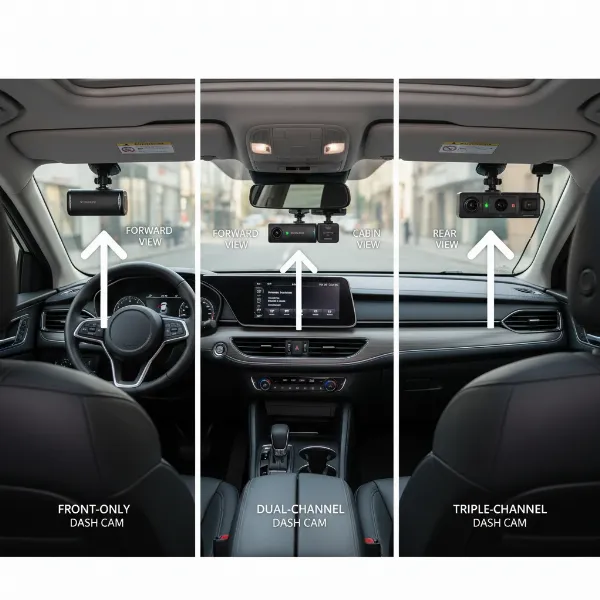 An illustrative image showing different types of dash cams, including front-facing, dual-channel (front and interior), and three-channel (front, interior, and rear) setups suitable for rideshare drivers, highlighting their respective camera coverage areas.
Key Features to Look for in a Rideshare Dash Cam
When investing in a dash cam for your rideshare business, certain features are non-negotiable to ensure maximum protection and usability. Prioritizing these elements will help you capture critical details and maintain operational efficiency.
Video Quality: Clarity is King
|
Our Picks for the Best Dash Cam in 2026
As an Amazon Associate I earn from qualifying purchases.
|
||
| Num | Product | Action |
|---|---|---|
| 1 | Garmin Dash Cam™ Mini 3, Ultracompact 1080p HD Dash Cam with a 140-degree Field of View, Built in Clarity™ Polarizer, Voice Controlled, Automatic Recording |

|
| 2 | 4K Dash Cam Front, Built-in 5G WiFi, 64GB Card Included, Dash Camera for Cars, Mini Dashcam with Super Night Vision, Loop Recording, G-Sensor, 24 Hours Parking Monitor, Support 256GB Max |
|
| 3 | VIOFO A229 Plus Dash Cam Front and Rear, Dual STARVIS 2 Sensors, 2 Channel HDR, 1440P+1440P Voice Control Car Dash Camera, 5GHz Wi-Fi, Voice Control, Ultra-Precise GPS |
|
| 4 | WOLFBOX G840S 12" 4K Mirror Dash Cam Backup Camera, 5.8GHz WiFi Smart Rearview Mirror for Cars & Trucks, Front and Rear View Dual Cameras, Night Vision, Parking Assistance, Included 32GB Card & GPS |
|
| 5 | 4K+4K Dash Cam Front and Rear, Free 128GB Card Included, 5.8GHz WiFi Dash Camera for Cars, Built-in GPS, G-Sensor, 170°Wide Angle, 3" IPS Screen, 24H Parking Mode, Support 512GB Max |
|
| 6 | ROVE R2-4K DUAL Dash Cam Front and Rear, STARVIS 2 Sensor, FREE 128GB Card Included, 5G WiFi - up to 20MB/s Fastest Download Speed with App, 4K 2160P/FHD Dash Camera for Cars, 3" IPS, 24H Parking Mode |
|
| 7 | Dual 4K Dash Cam Front and Rear - Free 64G SD Card, 2160P+2160P UHD Dash Camera for Cars, Dashcam with 176°+160° Wide Angle, 3.5'' IPS Screen Dashcam, G-Sensor, WDR, Night Vision, 24H Parking Monitor |
|
| 8 | REDTIGER 4K Dash Cam Front Rear, STARVIS 2 Sensor, Free Card Included, 5.8GHz WiFi-20MB/s Fast Download, Dash Camera for Cars with GPS, WDR Night Vision, 170°Wide Angle, 24H Parking Mode(F7NP) |
|
| 9 | Dash Cam Front and Rear, 2.5K Dual Dash Camera for Cars, 2560P Mini Car Camera, 2 inch IPS Screen, 32GB Card Included, WDR Night Vision, 24 Hours Parking Monitor, G-Sensor, Support 256 GB Max |
|
| 10 | Dash Cam Front and Rear, 1080P Dash Camera for Cars, 3 Channel Car Camera Front Rear and Inside with 32GB Card, Loop Recording, Night Vision, HDR, 24Hr Parking, G-Sensor |
|
The resolution and clarity of your dash cam footage are paramount. Look for a device that offers at least 1080p Full HD recording, though 2K or 4K Ultra HD provides superior detail, making it easier to identify license plates, faces, and other crucial elements. Modern dash cams often feature advanced image sensors like Sony STARVIS 2, which excel in capturing clear video even in challenging lighting conditions, such as driving at night or through tunnels. A wide-angle lens (typically 140-170 degrees) is also essential to capture a broad view of the road and the entire cabin.
Night Vision: Unseen Protection After Dark
Many rideshare trips occur after sunset, making robust night vision capability a critical feature. For interior recording, infrared (IR) LED lights are vital, allowing the camera to capture clear video of passengers even in pitch-black conditions without emitting distracting visible light. Ensure both front and interior cameras perform well in low-light environments to document any incident accurately, day or night.
Parking Mode: Your Car’s Guardian When You’re Away
A reliable parking mode provides surveillance even when your vehicle is turned off. Dash cams equipped with G-sensors can detect impacts or sudden movements, automatically initiating recording. More advanced parking modes use motion detection to record when activity is sensed around your parked car. This feature is invaluable for documenting hit-and-runs, vandalism, or other incidents that occur when you’re not in the driver’s seat. For continuous parking surveillance, hardwiring the dash cam to your vehicle’s fuse box is often required.
GPS Functionality: Pinpointing Location and Speed
Integrated GPS is more than just a convenience; it’s a vital piece of evidence. A GPS module accurately records your vehicle’s speed and precise location, embedding this data into your video footage. In the event of an accident or dispute, this information can corroborate your statements and provide an undeniable timeline of events, proving invaluable for insurance claims or legal proceedings.
Wi-Fi Connectivity: Instant Access to Footage
Built-in Wi-Fi allows you to wirelessly connect your smartphone to your dash cam, providing instant access to recorded footage. This means you can easily view, download, and share clips directly from your phone without needing to remove the microSD card. Some advanced systems offer cloud connectivity, enabling remote access and automatic uploads for an extra layer of security.
Audio Recording: A Full Account (with Caveats)
Many dash cams include a microphone to record in-cabin audio. This can provide crucial context during disputes or altercations. However, it’s imperative to be aware of and comply with local laws regarding audio recording. Some jurisdictions require two-party consent, meaning all parties must agree to be recorded. You may need to disable audio recording or inform passengers verbally or with a visible sign if such laws apply in your area.
Storage Capacity: Keeping More Evidence
Dash cams record continuously, overwriting older footage once the memory card is full. For rideshare drivers, ample storage is crucial. A minimum of 32GB is recommended, but opting for 64GB, 128GB, or even 256GB (or higher, up to 512GB) microSD cards allows for significantly longer recording times before footage is overwritten. Always choose high-endurance, reputable brand SD cards designed for continuous recording to ensure reliability.
Durability and Heat Resistance: Built for the Road
Your dash cam will endure constant vibrations, varying temperatures, and direct sunlight. Look for models built with robust components that can withstand extreme heat and cold without compromising performance. A durable dash cam will ensure consistent operation day in and day out.
Discreet Design: Blending In
While notifying passengers of recording is essential, a dash cam that is compact and unobtrusive can make some passengers feel more at ease. A smaller, less conspicuous camera is often preferred, allowing for effective surveillance without being overly noticeable.
Top Dash Cam Recommendations for Uber, Lyft, and Rideshare Drivers
Based on extensive testing and driver feedback, several dash cam models consistently rise to the top for rideshare professionals. Here are some of the best options available in 2024-2025, chosen for their reliability, features, and performance.
| Model | Channels | Front Resolution | Interior Resolution | Key Features for Rideshare | Price Range |
|---|---|---|---|---|---|
| Vantrue N4 Pro | 3-Channel | 4K UHD | 1080p Full HD IR | Industry-best HDR, Novatek chipset, voice control, 24/7 parking mode, up to 512GB SD support. | $350 – $400 |
| BlackVue DR970X-2CH-IR-PLUS | 2-Channel | 4K UHD | 1080p Full HD IR | Premium cloud-ready, Sony STARVIS 2, buffered parking mode, sleek design, direct Wi-Fi/LTE. | $400 – $500 |
| VIOFO A229 3CH PRO | 3-Channel | 4K UHD | 2K QHD IR | Dual Sony STARVIS 2 sensors, HDR for all channels, smart voice control, ultra-fast 5GHz Wi-Fi. | $300 – $350 |
| Vantrue N2S | 2-Channel | 2K QHD | 1080p Full HD IR | Affordable, infrared night vision with Sony sensor, GPS, parking monitor, compact design. | $200 – $250 |
Detailed Reviews of Notable Dash Cams
Vantrue N4 Pro: The Feature-Packed Protector
The Vantrue N4 Pro stands out as a top contender, offering a comprehensive three-channel recording system with a stunning 4K front camera, 1080p interior, and 1080p rear cameras. What truly sets it apart is its industry-best HDR recording and the latest Novatek chipset, ensuring crystal-clear footage day and night. Drivers praise its voice control, allowing hands-free operation, and its robust 24/7 parking mode. With support for up to 512GB microSD cards, the N4 Pro is an excellent choice for drivers seeking maximum coverage and cutting-edge technology.
> “The Vantrue N4 Pro delivers unparalleled video quality, capturing every detail, including license plates, better than any other dash cam on the market. Its HDR recording and 5GHz Wi-Fi are game-changers for rideshare drivers.” – Admin, Dashcamon.com
BlackVue DR970X-2CH-IR-PLUS: Premium Cloud Connectivity
For drivers who demand premium quality and advanced features, the BlackVue DR970X-2CH-IR-PLUS is a prime option. This two-channel system features a 4K Ultra HD front camera and a Full 1080p HD infrared interior camera with a Sony STARVIS 2 sensor. Its standout feature is its cloud-readiness, allowing for remote live view, GPS tracking, and instant alerts via Wi-Fi hotspot or an optional LTE module. The “box” recording unit can be discreetly tucked away, offering a sleek, stealthy design. It’s a significant investment, but the reliability and cloud features are hard to beat.
VIOFO A229 3CH PRO: Customization and Clarity
The VIOFO A229 3CH PRO is a dream for drivers who appreciate detailed customization and exceptional clarity. This three-channel system boasts dual Sony STARVIS 2 sensors, providing excellent low-light performance across all three cameras (4K front, 2K interior, 1080p rear). It supports HDR for all channels, ensuring balanced exposure in varying light. Drivers will appreciate the smart voice control, ultra-fast 5GHz Wi-Fi, and precise GPS, all accessible through its user-friendly interface. It’s a versatile and powerful choice for thorough documentation.
Vantrue N2S: The Reliable All-Rounder
If you’re seeking a proven and affordable dual-channel solution, the Vantrue N2S is an excellent all-in-one choice. It offers 2K front recording and 1080p interior recording with infrared night vision, making it suitable for most Uber and Lyft drivers. Its compact design and reliable performance have made it a popular option for those who need solid protection without breaking the bank. The N2S includes GPS and a parking monitor, covering essential rideshare needs at a more accessible price point.
Legal and Ethical Considerations for Rideshare Drivers
While dash cams are a powerful tool for safety, their use comes with important legal and ethical responsibilities, especially when recording passengers.
First and foremost, always check your local and state laws regarding video and audio recording. Some states are “one-party consent” states, meaning only one person needs to be aware of the recording, while others are “two-party consent” states, requiring all recorded parties to agree. Lyft states that using recording devices during trips is subject to local rules and regulations, and drivers may need to secure consent before filming. Uber does not mandate dash cams but drivers should check their policies and local laws.
It is best practice to notify passengers that they are being recorded. This can be done verbally when they enter the vehicle or through a clearly visible sign posted in your car. This transparency helps avoid discomfort and potential legal issues. Ensure your dash cam is placed in a visible area and does not obstruct your view of the road. Footage should only be used for safety purposes, incident documentation, or reporting serious issues to Uber/Lyft or law enforcement. Never post dash cam footage of passengers online without explicit consent, as this can violate privacy laws and platform policies.
Installation and Maintenance Tips
Proper installation and regular maintenance are key to ensuring your dash cam reliably serves its purpose.
Optimal Placement
Mount your dash cam securely to your windshield, ideally behind your rearview mirror, to ensure it doesn’t obstruct your line of sight. For dual or three-channel systems, make sure the interior camera has a clear, wide view of the entire cabin, including both front and rear passenger seats. Similarly, if you have a rear camera, position it to capture the back road clearly. Test the camera’s view by sitting in all seats and walking around your car to confirm comprehensive coverage.
Powering Your Dash Cam
Most dash cams are powered via a cigarette lighter adapter. For parking mode functionality, you’ll likely need a hardwiring kit to connect the dash cam directly to your car’s fuse box, ensuring it receives power even when the ignition is off. Professional installation is often recommended for hardwiring.
SD Card Management
The microSD card is the heart of your dash cam’s storage. Use only high-endurance memory cards designed for continuous loop recording. Standard SD cards may wear out quickly. Regularly format your SD card (e.g., once a month) to maintain its health and prevent data corruption. Replace the SD card every 6-12 months, depending on usage, as they have a finite lifespan.
Common Questions When Buying a Dash Cam
What is the ideal number of channels for a rideshare dash cam?
For rideshare drivers, a dual-channel dash cam (front and interior) is generally the minimum recommended for adequate protection. However, a three-channel system (front, interior, and rear) offers the most comprehensive coverage, providing superior peace of mind and evidence in all directions.
Can I use a GoPro as a dash cam for rideshare?
While a GoPro can record high-quality video, it is not ideal for continuous, loop recording like a dedicated dash cam. GoPros are designed for shorter action clips and may overheat or have limited battery life for extended rideshare shifts. Dedicated dash cams also offer features like parking mode and automatic incident detection that GoPros lack.
How much storage do I really need?
Rideshare drivers should aim for at least 64GB of storage, though 128GB or 256GB is highly recommended. This allows for several hours of high-resolution footage before the loop recording feature starts overwriting older files. More storage means retaining critical footage for longer periods.
Should I inform passengers about the dash cam?
Yes, it is highly recommended to inform passengers, either verbally or with a clear sign, that recording is taking place. This is not only a matter of transparency and courtesy but can also be a legal requirement in some areas, particularly concerning audio recording.
What about temperature extremes?
Choose a dash cam designed with robust components capable of withstanding both high summer heat and freezing winter temperatures. Supercapacitors are often preferred over lithium-ion batteries in dash cams for better durability and safety in extreme conditions.
Conclusion
For every Uber, Lyft, or rideshare driver, a high-quality dash cam is an essential investment that significantly enhances safety, security, and professional integrity. By providing irrefutable video evidence, these devices safeguard you against false claims, deter undesirable behavior, and offer invaluable peace of mind on every trip. Prioritizing features like multi-channel recording, superior night vision, and reliable parking mode will ensure you’re well-equipped for the demands of rideshare driving.
Remember to research local laws regarding recording passengers and always maintain transparency. A dash cam is more than just a camera; it’s your personal safeguard, helping you navigate the complexities of the road with confidence. What feature do you consider most critical in a Dash Cam for your daily rideshare adventures?