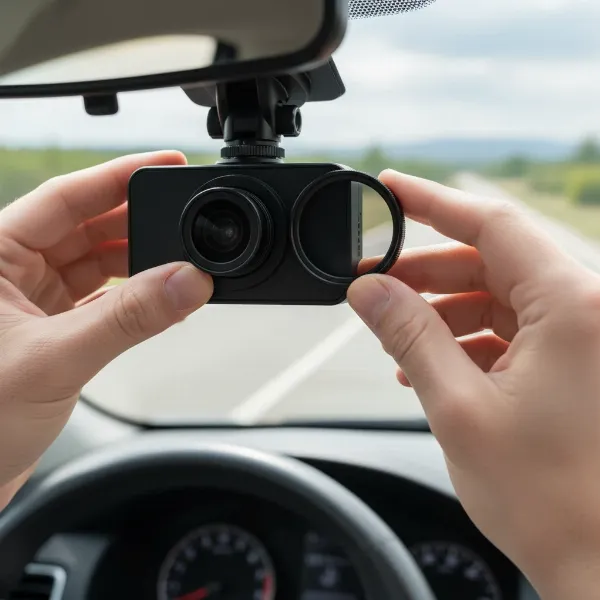
Choosing a dash cam involves sifting through a myriad of specifications, each promising unparalleled footage. Yet, few factors spark as much debate among drivers and tech enthusiasts as Frames Per Second (FPS) when it comes to capturing crucial details like license plates. Is 30 frames per second sufficient, or does 60fps offer a distinct advantage for identification? As a dash cam technician with over a decade of hands-on experience, I’ve observed countless hours of footage and evaluated hundreds of models. This guide will cut through the technical jargon, focusing on the real-world impact of 30fps versus 60fps on license plate readability, helping you make an informed decision for your road safety.
Understanding Frames Per Second (FPS) in Dash Cams
Frames Per Second (FPS) simply indicates the number of individual images your dash cam captures and stitches together each second to create a video. Think of it as a flipbook; more pages (frames) per second result in smoother, more fluid animation. The most common frame rates for dash cams are 30fps and 60fps. While a higher FPS generally translates to smoother video, its direct impact on license plate clarity, especially under varying conditions, is more nuanced than many assume.
30fps vs. 60fps: The Core Comparison for License Plates
The battle between 30fps and 60fps often centers on a balance between motion fluidity and the ability to capture distinct details. For identifying license plates, this distinction becomes critical.
Daytime Performance: Capturing Clarity on the Move
|
Our Picks for the Best Dash Cam in 2026
As an Amazon Associate I earn from qualifying purchases.
|
||
| Num | Product | Action |
|---|---|---|
| 1 | Dual 4K Dash Cam Front and Rear - Free 64G SD Card, 2160P+2160P UHD Dash Camera for Cars, Dashcam with 176°+160° Wide Angle, 3.5'' IPS Screen Dashcam, G-Sensor, WDR, Night Vision, 24H Parking Monitor |

|
| 2 | 4K+4K Dash Cam Front and Rear, Free 128GB Card Included, 5.8GHz WiFi Dash Camera for Cars, Built-in GPS, G-Sensor, 170°Wide Angle, 3" IPS Screen, 24H Parking Mode, Support 512GB Max |
|
| 3 | Garmin Dash Cam™ Mini 3, Ultracompact 1080p HD Dash Cam with a 140-degree Field of View, Built in Clarity™ Polarizer, Voice Controlled, Automatic Recording |
|
| 4 | REDTIGER 4K Dash Cam Front Rear, STARVIS 2 Sensor, Free Card Included, 5.8GHz WiFi-20MB/s Fast Download, Dash Camera for Cars with GPS, WDR Night Vision, 170°Wide Angle, 24H Parking Mode(F7NP) |
|
| 5 | Dash Cam Front and Rear, 1080P Dash Camera for Cars, 3 Channel Car Camera Front Rear and Inside with 32GB Card, Loop Recording, Night Vision, HDR, 24Hr Parking, G-Sensor |
|
| 6 | VIOFO A229 Plus Dash Cam Front and Rear, Dual STARVIS 2 Sensors, 2 Channel HDR, 1440P+1440P Voice Control Car Dash Camera, 5GHz Wi-Fi, Voice Control, Ultra-Precise GPS |
|
| 7 | ROVE R2-4K DUAL Dash Cam Front and Rear, STARVIS 2 Sensor, FREE 128GB Card Included, 5G WiFi - up to 20MB/s Fastest Download Speed with App, 4K 2160P/FHD Dash Camera for Cars, 3" IPS, 24H Parking Mode |
|
| 8 | 4K Dash Cam Front, Built-in 5G WiFi, 64GB Card Included, Dash Camera for Cars, Mini Dashcam with Super Night Vision, Loop Recording, G-Sensor, 24 Hours Parking Monitor, Support 256GB Max |
|
| 9 | WOLFBOX G840S 12" 4K Mirror Dash Cam Backup Camera, 5.8GHz WiFi Smart Rearview Mirror for Cars & Trucks, Front and Rear View Dual Cameras, Night Vision, Parking Assistance, Included 32GB Card & GPS |
|
| 10 | Dash Cam Front and Rear, 2.5K Dual Dash Camera for Cars, 2560P Mini Car Camera, 2 inch IPS Screen, 32GB Card Included, WDR Night Vision, 24 Hours Parking Monitor, G-Sensor, Support 256 GB Max |
|
In well-lit daytime conditions, the difference between 30fps and 60fps can be subtle, yet significant for fast-moving targets. A 60fps dash cam records twice as many frames per second, which means it captures more individual snapshots of a vehicle as it passes. This increased frequency can offer more “opportunities” to snag a clear, unblurred image of a license plate, especially if the vehicle is traveling at high speeds or quickly exiting the frame. When reviewing footage in slow motion, 60fps video appears notably smoother, allowing for more precise frame-by-frame analysis without the choppiness often associated with 30fps. [cite: 2_search_2, 3_search_3] For static or slower-moving vehicles, 30fps is often perfectly adequate, as there is less motion blur to contend with in each frame.
Nighttime and Low-Light Challenges: A Different Picture
When the sun sets, the calculus for FPS and license plate visibility changes dramatically. In low-light environments, dash cams typically need longer exposure times to gather enough light for a well-exposed image.
> “At night, quality depends more on sensor size, aperture, and noise handling. 60fps may reduce exposure time per frame, which can hurt low-light detail.” – Expert Technician, Dashcamon.com
A 30fps setting allows for a longer exposure time per frame (up to 1/30th of a second) compared to 60fps (up to 1/60th of a second). This longer exposure can result in a brighter image with less digital noise. However, longer exposure also means a higher chance of motion blur if the subject (like a moving license plate) is in motion during that extended exposure window. Conversely, 60fps, with its shorter exposure window, might theoretically reduce motion blur, but it can also lead to darker, underexposed frames in low light unless the camera has an exceptionally good sensor and lens aperture. Therefore, for clear license plate capture at night, factors like the dash cam’s image sensor (e.g., Sony STARVIS), lens aperture (f/1.8 or lower is better), and Wide Dynamic Range (WDR) or High Dynamic Range (HDR) capabilities often outweigh the FPS number alone. [cite: 5_search_5]
The Role of Shutter Speed vs. FPS in Motion Blur
A common misconception is that higher FPS directly eliminates motion blur. While 60fps offers more frames to potentially find a less-blurred image, motion blur is primarily controlled by the camera’s shutter speed, not the frame rate. A fast shutter speed “freezes” motion, reducing blur, regardless of whether the camera is shooting at 30fps or 60fps. In bright conditions, dash cams can use fast shutter speeds. In low light, however, shutter speed slows down to allow more light in, inevitably introducing more motion blur, even at 60fps. If the shutter speed is too slow, a license plate can remain unreadable regardless of the frame rate. [cite: 2_search_2, 3_search_3]
Resolution: The Unsung Hero for License Plate Clarity
While FPS dictates the smoothness of motion, resolution (measured in pixels like 1080p, 1440p, or 4K) determines the sheer amount of detail captured in each frame. For identifying small text like license plate numbers, resolution is paramount. More pixels mean finer details and the ability to digitally zoom into footage without it immediately dissolving into pixelated mush.
There’s often a trade-off in dash cams:
- 4K (3840×2160) at 30fps: Offers significantly more detail per frame, making it excellent for identifying stationary or slow-moving license plates, or for zooming into a wider scene to pinpoint a plate. Each individual frame holds more data. [cite: 3_search_3]
- 1080p (1920×1080) or 1440p (2560×1440) at 60fps: Provides smoother motion and more frames to choose from, which can be beneficial for fast-moving targets, but with fewer overall pixels in each frame. This means less detail if you need to zoom in heavily.
Many high-end commercial license plate recognition systems often utilize 1080p at 60fps, suggesting that for automated systems tracking fast-moving plates, the balance of frames and a decent resolution is effective. However, for a human reviewing footage, higher resolution like 4K can provide more granular detail, even if the frame rate is lower. Ultimately, for license plate legibility, you need enough pixels to resolve the characters; a blurry, low-resolution plate at 60fps is no better than one at 30fps. [cite: 4_search_1, 4_search_4]
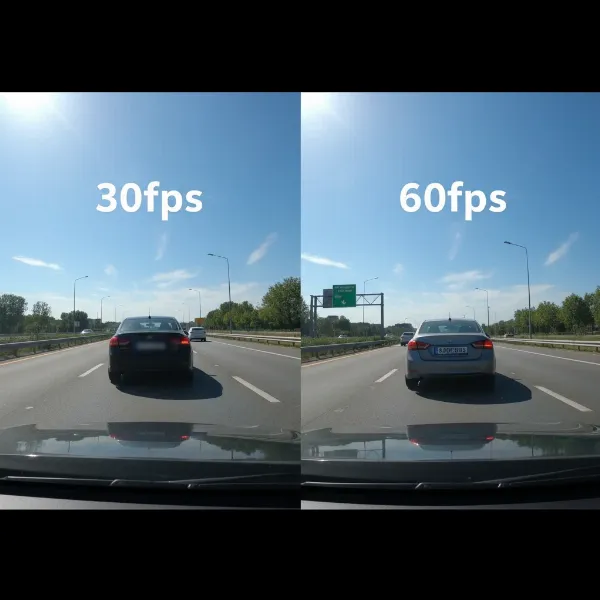 A dash cam recording a car with a visible license plate, illustrating the difference between 30fps and 60fps in motion blur and detail
Beyond FPS and Resolution: Other Critical Factors for Plate Recognition
While FPS and resolution are vital, several other elements significantly influence a dash cam’s ability to capture legible license plates:
- Lens Quality & Aperture: A high-quality lens with a wide aperture (low f-number, e.g., f/1.6 or f/1.8) allows more light to reach the sensor, improving clarity and reducing noise, especially in low light. [cite: 5_search_5]
- Image Sensor: Premium sensors like Sony STARVIS are designed for superior low-light performance, capturing clearer images in challenging conditions where license plates are often hardest to read. [cite: 5_search_5]
- HDR/WDR (High/Wide Dynamic Range): These technologies balance extreme bright and dark areas in a scene, preventing headlights from blooming into an unreadable glare and ensuring details in shadows are visible. This is crucial for illuminated license plates at night. [cite: 5_search_5]
- Field of View (FOV): While a wide FOV captures more of the scene, it also makes distant objects, like license plates, appear smaller and harder to distinguish. In some cases, a slightly narrower FOV might improve plate legibility. [cite: 4_search_1]
- Video Compression: Aggressive compression can degrade image quality, turning fine details like license plate characters into pixelated artifacts, even if the initial resolution and FPS were high.
- Environmental Factors: Sun glare, rain, fog, and reflective license plates (common in North America) can significantly hinder readability, regardless of your dash cam’s specifications. [cite: 4_search_4] Adjusting Exposure Value (EV) can sometimes help mitigate glare. [cite: 5_search_5]
Storage and Processing Implications
Opting for 60fps over 30fps comes with practical implications for your dash cam system:
- Larger File Sizes: Recording at 60fps generates significantly larger video files—often nearly double the size of 30fps footage at the same resolution. [cite: 2_search_2, 3_search_3] This means your memory card will fill up faster, leading to older footage being overwritten sooner. You’ll need higher-capacity microSD cards, which can add to the overall cost.
- Increased Processing Demands: Higher frame rates require more powerful processors within the dash cam, which can impact the cost and potentially lead to more heat generation.
- Memory Card Wear: Constantly writing larger files can accelerate the wear and tear on your microSD card, necessitating more frequent replacements.
Making Your Choice: When to Prioritize 30fps vs. 60fps
The ideal FPS setting depends on your primary driving environment and priorities.
-
When 30fps is Sufficient:
- Everyday City Driving: If your driving mostly involves urban environments with lower speeds, 30fps generally provides sufficient detail for insurance purposes.
- Budget & Storage Conscious: For those mindful of storage space and not needing forensic-level slow-motion, 30fps is a practical and cost-effective choice.
- Prioritizing Low-Light Performance: If clear nighttime footage of stationary or slow-moving vehicles is a higher priority, 30fps (combined with good sensors and aperture) might offer better overall exposure.
-
When 60fps is Beneficial:
- Frequent Highway Driving: At high speeds, 60fps excels at capturing smoother motion and offers more frames to analyze rapidly moving vehicles or sudden incidents.
- High-Speed Interactions: If you frequently encounter fast-changing traffic situations, the smoother playback of 60fps can be invaluable for pinpointing specific moments or actions.
- Slow-Motion Analysis: For those who need to meticulously review footage frame-by-frame, 60fps provides superior slow-motion fluidity, making it easier to identify transient details. [cite: 2_search_2, 3_search_3]
Dash Cam Selection Criteria: Integrating FPS for Optimal License Plate Capture
When selecting a dash cam, consider how FPS fits into the broader picture of critical features:
Essential Dash Cam Features for Clarity
- Image Quality: Aim for at least 1080p, with 1440p or 4K being ideal for maximizing detail and zoom capability, which are crucial for license plates. Remember the trade-off between 4K@30fps and 1440p@60fps.
- Advanced Features:
- G-sensor (Gravity Sensor): Automatically locks footage during an impact, protecting it from being overwritten.
- GPS: Records location and speed data, providing crucial context for incidents.
- Loop Recording: Ensures continuous recording by overwriting the oldest files when the memory card is full.
- Parking Mode: Records events when your car is parked, often using motion detection or impact sensing. Some parking modes can even reduce FPS to save storage.
- HDR/WDR: Vital for balancing exposure in challenging lighting, preventing glares that obscure license plates. [cite: 5_search_5]
- Durability: Look for dash cams built with high-quality components that can withstand extreme temperatures and vibrations common in vehicles.
- Reputable Brands: Brands known for reliable hardware, consistent firmware updates, and good customer support are always a safer bet.
Buying and Installation Guidance
- Where to Buy: Purchase from authorized dealers online or in reputable electronics stores to ensure warranty and genuine products.
- Installation: For optimal performance, professional installation (especially for hardwiring parking mode) is often recommended. Ensure the camera’s field of view is unobstructed.
- Maintenance: Regularly format your microSD card (monthly is a good practice) and replace it periodically (every 6-12 months for heavy users) to prevent data corruption. Always back up important footage immediately.
Frequently Asked Questions About Dash Cam FPS and License Plates
Is 60fps always better for capturing license plates?
Not necessarily. While 60fps provides smoother motion and more frames to choose from, resolution, shutter speed, lens quality, and proper exposure (especially at night) are often more critical for actual license plate legibility. In low light, 30fps might even allow for better image exposure. [cite: 3_search_3]
Should I choose 4K 30fps or 1080p 60fps for better license plate capture?
For maximum detail and the ability to zoom in on a plate, 4K 30fps often provides a sharper image due to its higher pixel density per frame. However, for extremely fast-moving vehicles where motion blur is a concern, 1080p 60fps might offer more clear frames overall. The best choice depends on your typical driving conditions. [cite: 3_search_3]
Does a higher FPS reduce motion blur on license plates?
FPS provides more frames, which can increase your chances of finding a less-blurred image. However, motion blur is primarily controlled by the camera’s shutter speed. A faster shutter speed “freezes” motion more effectively. [cite: 2_search_2]
Does 60fps use significantly more storage than 30fps?
Yes, generally, 60fps footage will result in approximately twice the file size of 30fps footage at the same resolution, requiring larger memory cards and potentially overwriting older files more quickly. [cite: 2_search_2, 3_search_3]
Is 30fps sufficient for insurance claims?
Yes, 30fps footage is generally accepted by insurance companies and law enforcement, provided the video clearly shows the incident and relevant details. Good resolution and bit rate are often more important than just the frame rate. [cite: 3_search_3]
Conclusion
The debate between 30fps and 60fps for dash cams, particularly concerning license plate readability, highlights a critical balance between motion fluidity and static detail. While 60fps offers undeniably smoother footage, providing more chances to capture a clear image of a fast-moving license plate, its advantages can be mitigated in low-light conditions or when resolution is sacrificed. For consistent license plate capture, particularly at speed, prioritizing a dash cam with a robust sensor, wide aperture lens, effective HDR/WDR, and sufficient resolution (1440p or 4K) often proves more impactful than FPS alone. Ultimately, the best frame rate for your dash cam is the one that reliably captures the evidence you need, balancing clarity, motion, and storage. What’s your experience been with different FPS settings in your Dash Cam?