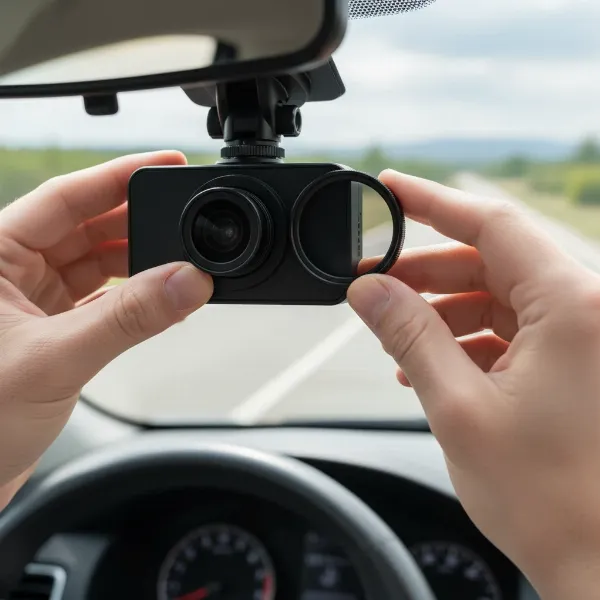
Leaving your car unattended, even for a short while, can expose it to unexpected incidents, from a minor door ding to a significant hit-and-run. This vulnerability is precisely why dash cams have evolved beyond mere driving recorders, offering crucial surveillance capabilities while your vehicle is parked. Understanding the different types of parking modes a dash cam offers is paramount to ensuring your vehicle receives the protection it deserves. This guide delves into the essential distinction between buffered and non-buffered parking modes, empowering you to make an informed choice for ultimate peace of mind.
Understanding Dash Cam Parking Modes
Dash cam parking mode is a specialized feature designed to monitor your vehicle when the engine is turned off, providing crucial evidence in case of incidents like vandalism, theft, or collisions. Unlike continuous recording while driving, parking mode optimizes power consumption and storage to maintain surveillance efficiently. To activate this essential functionality, a dash cam typically requires a hardwired connection to your vehicle’s fuse box or an external battery pack, as a simple cigarette lighter connection usually cuts power with the ignition.
Non-Buffered Parking Mode: Event-Triggered Recording
Non-buffered parking mode operates on a reactive principle: it initiates recording only after an event has been detected. In this mode, the dash cam typically enters a low-power standby state. When its G-sensor detects an impact or its motion detector senses movement within its field of view, the camera “wakes up” and begins to record. This approach conserves battery life and memory card space, as it avoids constant recording of uneventful periods.
The primary advantage of non-buffered parking mode is its efficiency. It draws minimal power, making it a suitable option for vehicles parked for extended periods without frequent driving to recharge the battery. Additionally, it results in less footage to review, as only clips related to detected events are saved to the memory card. This can be particularly useful in low-risk parking environments where incidents are rare and battery drain is a major concern.
However, the main drawback of non-buffered parking mode is its potential to miss critical lead-up footage. Since recording only starts after an event, you might only capture the impact itself or its immediate aftermath. For instance, in a hit-and-run, you might see the collision but not the vehicle approaching or the driver’s actions just before the impact, which could be crucial for identification. This reactive nature means you might not always get the full story.
Buffered Parking Mode: Comprehensive Protection
Buffered parking mode, often considered the gold standard in dash cam surveillance, provides a more comprehensive record of parking incidents. Unlike its non-buffered counterpart, a buffered dash cam continuously records video to a temporary internal cache or buffer, but it does not save this footage to the memory card unless an event occurs. When an impact is detected by the G-sensor or motion is sensed, the dash cam then saves the footage from before the event (typically 10-30 seconds prior) and continues recording after the event for a set duration.
This “pre-event” recording capability is the critical difference and a game-changer for evidence collection. It ensures that you capture not just the moment of impact or motion, but also what led up to it. For example, if another car backs into yours, buffered parking mode can show that vehicle approaching, parking maneuvers, and potentially even the driver exiting their car before the collision. This provides a complete narrative, significantly increasing the chances of identifying responsible parties and gathering irrefutable evidence for insurance claims. Many premium dash cams offer this advanced functionality, recognizing its value in providing a full picture of any incident.
> “Buffered parking mode is indispensable because it captures the crucial moments before an incident, not just the aftermath. This ‘pre-event’ footage often holds the key to understanding what truly happened.” – Dashcamon.com Admin, Dash Cam Specialist
While buffered parking mode offers superior protection, it typically consumes slightly more power than non-buffered mode because the camera is constantly recording to its internal buffer. However, modern buffered systems are highly optimized for power efficiency, balancing continuous surveillance with battery preservation. The benefit of capturing a more complete sequence of events far outweighs the marginal increase in power draw for most users seeking maximum security.
Key Differences: Buffered vs. Non-Buffered Dash Cam Parking Modes
Understanding the core distinctions between these two parking mode types is essential for selecting the right dash cam for your security needs. The table below highlights the critical differences, focusing on how each mode triggers recording and the scope of footage captured.
| Feature | Non-Buffered Parking Mode | Buffered Parking Mode |
|---|---|---|
| Recording Trigger | Starts recording after motion or impact is detected. | Continuously records to an internal buffer; saves to card before and after motion/impact. |
| Footage Captured | Primarily records the event itself and its aftermath. | Captures the entire event: moments leading up to it, the event itself, and its aftermath. |
| Evidence Value | Limited; may miss crucial lead-up context. | Comprehensive; provides a full narrative for better evidence. |
| Power Consumption | Lower (camera mostly in standby). | Higher (continuously buffering, but optimized). |
| Memory Card Usage | Less (only event files saved). | More (event files include pre-buffered footage). |
| Best For | Low-risk parking areas, minimal power drain concern. | High-risk areas, maximum protection, identifying culprits. |
This comparison underscores that while both modes offer parking surveillance, buffered recording provides a significantly richer and more valuable set of evidence.
Powering Your Dash Cam’s Parking Mode
For any dash cam parking mode to function effectively, a consistent power supply is crucial, even when your vehicle’s engine is off. The most common and recommended method is hardwiring the dash cam directly into your car’s fuse box. This direct connection ensures a continuous power feed, enabling 24/7 surveillance.
To prevent your car’s battery from draining, a voltage cut-off protection feature is vital. Most quality hardwire kits and advanced dash cams include this built-in safeguard, which automatically shuts off the dash cam if your car battery’s voltage drops below a preset safe level (typically 11.6V–12V). This ensures you’ll always have enough power to start your engine the next morning.
For those requiring extended parking surveillance beyond what their car battery can safely provide (e.g., more than 12-24 hours for some setups), external dash cam battery packs are an excellent solution. These dedicated lithium-ion battery packs power the dash cam independently, recharging while you drive and protecting your vehicle’s main battery from any strain. They are especially beneficial for long-term parking in high-risk areas.
Beyond Basic Parking Modes: Advanced Features
Modern dash cams often incorporate advanced parking mode features that go beyond simple impact or motion detection, offering greater flexibility and efficiency.
Time-Lapse Recording is a popular option where the dash cam continuously records at a very low frame rate (e.g., 1 frame per second). This compresses hours of footage into minutes, saving significant memory card space and reducing power consumption while still capturing continuous activity. If an impact is detected, it typically triggers a full-speed, buffered event recording.
Low Bitrate Recording offers another form of continuous surveillance by recording video at a reduced quality or file size. This mode still captures audio and motion, but in smaller files, allowing for longer recording durations on the memory card with relatively low power draw.
For the utmost in power efficiency and precision, some premium dash cams feature Radar Parking Mode. These systems utilize radar sensors to detect approaching objects or motion from a distance. When activity is sensed, the camera “wakes up” from an ultra-low power state and initiates a buffered recording, providing excellent pre-event footage with minimal battery drain over extended periods.
Choosing the Right Parking Mode for Your Needs
Selecting the optimal dash cam parking mode depends on a few key factors: your typical parking environment, how frequently you drive, and your desired level of security.
If you park in a relatively safe, low-traffic area, or if you primarily drive daily, a non-buffered parking mode might suffice. It provides basic event recording with minimal impact on your car’s battery, and you’ll still have evidence of direct impacts. However, be aware that you might miss the moments leading up to an incident.
For those who park in high-risk areas, public lots, or frequently leave their vehicle unattended for extended periods, a buffered parking mode is highly recommended. The ability to capture pre-event footage is invaluable for comprehensive evidence, especially in cases of hit-and-runs or vandalism where the full context is crucial. Paired with a hardwire kit that includes voltage cut-off protection or an external battery pack, buffered mode offers superior surveillance without risking your car’s battery.
Consider also advanced features like time-lapse or radar-assisted modes if you need continuous, long-duration recording with optimized power usage. Evaluate your specific needs to strike the perfect balance between protection, power consumption, and storage management.
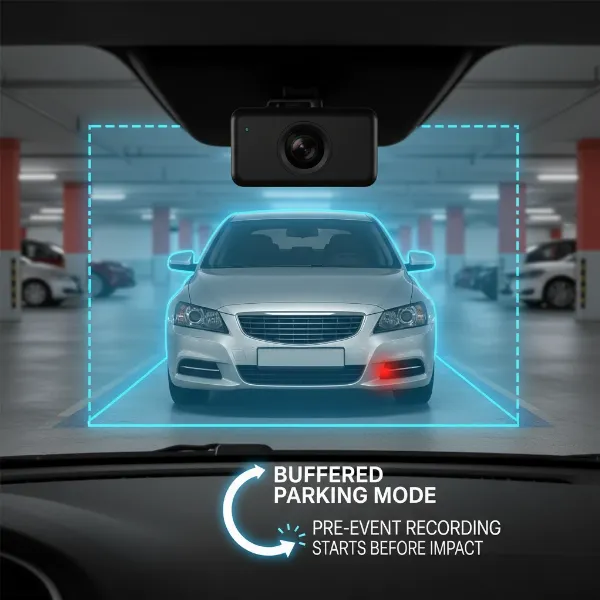 A dash cam monitoring a parked car with both buffered and non-buffered zones indicated, highlighting pre-event recording.
Conclusion
The distinction between buffered and non-buffered parking modes is a critical one for anyone seeking to maximize their vehicle’s protection with a dash cam. While non-buffered mode offers efficient, event-triggered recording, buffered parking mode stands out by providing a complete narrative of any incident, capturing vital moments both before and after an event. This comprehensive footage significantly enhances your ability to identify culprits and secure insurance claims. By understanding these differences and equipping your vehicle with the right power solutions, you can confidently choose a dash cam that provides unparalleled peace of mind, ensuring your car is always under vigilant watch. Don’t leave your vehicle’s security to chance; invest in the parking mode that best suits your protective needs.
Frequently Asked Questions
Does parking mode drain my car battery?
|
Our Picks for the Best Dash Cam in 2026
As an Amazon Associate I earn from qualifying purchases.
|
||
| Num | Product | Action |
|---|---|---|
| 1 | 4K Dash Cam Front, Built-in 5G WiFi, 64GB Card Included, Dash Camera for Cars, Mini Dashcam with Super Night Vision, Loop Recording, G-Sensor, 24 Hours Parking Monitor, Support 256GB Max |

|
| 2 | 4K+4K Dash Cam Front and Rear, Free 128GB Card Included, 5.8GHz WiFi Dash Camera for Cars, Built-in GPS, G-Sensor, 170°Wide Angle, 3" IPS Screen, 24H Parking Mode, Support 512GB Max |
|
| 3 | REDTIGER 4K Dash Cam Front Rear, STARVIS 2 Sensor, Free Card Included, 5.8GHz WiFi-20MB/s Fast Download, Dash Camera for Cars with GPS, WDR Night Vision, 170°Wide Angle, 24H Parking Mode(F7NP) |
|
| 4 | Dash Cam Front and Rear, 1080P Dash Camera for Cars, 3 Channel Car Camera Front Rear and Inside with 32GB Card, Loop Recording, Night Vision, HDR, 24Hr Parking, G-Sensor |
|
| 5 | WOLFBOX G840S 12" 4K Mirror Dash Cam Backup Camera, 5.8GHz WiFi Smart Rearview Mirror for Cars & Trucks, Front and Rear View Dual Cameras, Night Vision, Parking Assistance, Included 32GB Card & GPS |
|
| 6 | Dash Cam Front and Rear, 2.5K Dual Dash Camera for Cars, 2560P Mini Car Camera, 2 inch IPS Screen, 32GB Card Included, WDR Night Vision, 24 Hours Parking Monitor, G-Sensor, Support 256 GB Max |
|
| 7 | VIOFO A229 Plus Dash Cam Front and Rear, Dual STARVIS 2 Sensors, 2 Channel HDR, 1440P+1440P Voice Control Car Dash Camera, 5GHz Wi-Fi, Voice Control, Ultra-Precise GPS |
|
| 8 | Garmin Dash Cam™ Mini 3, Ultracompact 1080p HD Dash Cam with a 140-degree Field of View, Built in Clarity™ Polarizer, Voice Controlled, Automatic Recording |
|
| 9 | Dual 4K Dash Cam Front and Rear - Free 64G SD Card, 2160P+2160P UHD Dash Camera for Cars, Dashcam with 176°+160° Wide Angle, 3.5'' IPS Screen Dashcam, G-Sensor, WDR, Night Vision, 24H Parking Monitor |
|
| 10 | ROVE R2-4K DUAL Dash Cam Front and Rear, STARVIS 2 Sensor, FREE 128GB Card Included, 5G WiFi - up to 20MB/s Fastest Download Speed with App, 4K 2160P/FHD Dash Camera for Cars, 3" IPS, 24H Parking Mode |
|
Yes, parking mode draws power from your car’s battery when the engine is off. However, quality dash cams and hardwire kits include low-voltage cut-off protection to automatically shut off the camera before it drains your battery to an unsafe level, ensuring your car will start.
What is the best way to power parking mode?
The most reliable way is to hardwire your dash cam directly to your car’s fuse box using a hardwire kit that includes voltage cut-off protection. For extended parking surveillance, an external dash cam battery pack is highly recommended to protect your vehicle’s battery.
How long can a dash cam record in parking mode?
The duration depends on your Dash Cam’s power consumption, your car battery’s health, and whether you use a hardwire kit with voltage protection or an external battery pack. With a robust setup, some systems can record for several days or even weeks.
Is buffered parking mode worth it?
Absolutely. Buffered parking mode is invaluable as it captures the crucial moments before an event, such as a hit-and-run, providing a complete visual record that significantly aids in identifying responsible parties and securing vital evidence.
What is the difference between motion detection and buffered parking mode?
Motion detection (non-buffered) typically starts recording after movement is detected. Buffered parking mode, however, continuously records to a temporary buffer and saves footage from before the detected motion or impact, offering a more complete view of the incident.